
|
|
Enough |
And | Or | Author | Company Name | Subject | Illustrations Title of Article | Title of Journal Proximity | Truncation
|
Much |
| Didn't Find Enough Articles - Need More. | Need Less |
Click here or use your back button to return to the previous screen.
| Found too Many Articles - Need Less. | Need More |
Add an additional concept. Instead of writing about how
violence on television affects children - write about the role
of the parent in the matter of television violence
and its effect, if any, on children:
Click here or use your back button to return to the previous screen.
UMI Proquest - Using AND
The command AND requires that the words on either
side of it be somewhere in any articles retrieved; but,
the words need not be close to each other nor does the article
have to discuss the relationship between them.
If you find that the articles retrieved are not related to your topics because your concepts are discussed in different parts of the article try using Word Proximity.
Click here or use your back button to return to the previous screen.
FINDING MORE USING OR
UMI Proquest - OR allows the addition of similar words
(synonyms).
This increases the change of finding
additional articles.
Step 1 - For each word in the search statement list
additional words with the same or similar meanings.
Rule 2. OR requires only one term to be present - more than one may be present but only one is required.
|
|
Click here or use your back button to return to the previous screen.
FINDING MORE USING TRUNCATION.
UMI PROQUEST
Instead of searching for children - search for child *. This tells the computer to find ALL words which start with the letters immediately preceeding the * no matter how long they are.
Note that this search is a work-saving version of:
Either search will find the related words - child, children, childs, childhood and will likely increase the number of records found.
Some cautions concerning TRUNCATION.
Click here or use your back button to return to the previous screen.
Limit the search to the title.
Specifying a TITLE search instructs the computer to search for the key words or phrases only in the TITLE FIELD. The rationale for such a search is that if the words or concepts are found in the title, it is more likely the book or article will be directly related to the subject being searched
Click here or use your back button to return to the previous screen.
Find articles by a specific author.
OR Note. Authors can be written lastname firstname, (a separating comma is optional) |
Authors will frequently write more than one article on a subject. If you find an author who has written an article you particularly like, search for additional articles by that author. They may be related to your topic.
Click here or use your back button to return to the previous screen.
Find articles from a specific journal or magazine.
Assignments are frequently constructed suggesting that certain periodicals, journals or magazines would be more helpful than others. And in your studies you may find particular periodicals more useful than others. This search demonstrates how you can limit a search to a specific periodical, journal or magazine title.
Because you are limiting to only one title using this method you may find you have to reduce the number of concepts or increase the use of OR.
Click here or use your back button to return to the previous screen.
Require search words to be close to one another
.Designate how close to each other you want your concepts
instead of AND use N# or W#
where # can be from 1 to 50.
W finds the words in the order listed.
N finds the words regardless of the order listed
The rationale for requiring words to be close to one another is that there is more likely to be a discussion of the relationship between those words than if they were far apart.
If the word television is found only in the first paragraph of a 10 page article and the word violence is only in the last paragraph of this article it is unlikely that there will be any discussion of the relationship between television and violence. By requiring these two words to be within 10 words of each other television w/10 violence (either word may come first) there is a much, much better chance of there being a discussion of the relationship between the two concepts in your search.
Increasing the distance between words will increase the number of articles found; but, is likely to decrease the relevancy of the articles retrieved.
Click here or use your back button to return to the previous screen.
Search for an Illustration
.
|
IL (chart) and child* and violence and (television or tv) |
The search IL(y) requires that at least one illustration appear in an article.
Click here or use your back button to return to the previous screen.
Search for articles related to a Specific Company
.
There is no really good way to search for a company name in this database. The best approach is to hope that the company name is mentioned in the Subject or Keyword field.
Click here or use your back button to return to the previous screen.
Search for articles with specific words in the SUBJECT heading field
.
The second search illustrated: DE
(air traffic control) - requires an exact subject heading and will find only those articles which have the exact subject heading:
Clicking on a subject heading in an article is the same as using DE.
The following notes apply to both types of searches.
NOTE!!!!
Click here or use your back button to return to the previous screen.
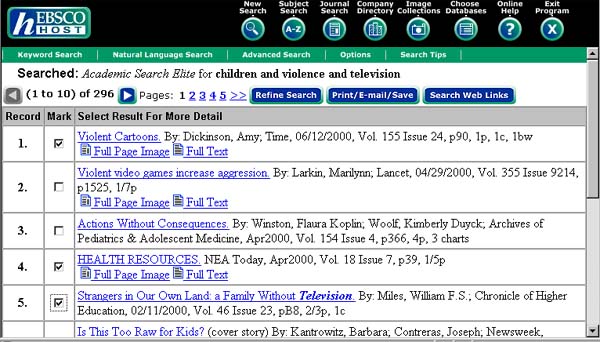
Printing and Emailing procedures for EBSCO Host
Conduct a search as indicated in "Basic Searching" or
"Advanced Searching". This will produce a list of articles
as illustrated in Box 1. If the list is more than 100 articles you
may wish to narrow your search to produce a shorter but more
relevant list of articles.
If the list of articles is a long one you may wish to make a
selection of articles to avoid filling your mailbox with
unnecessary or unwanted articles. Select an article by placing
a check in the box to the left of the article title. (Clicking
a second time will remove the check from the box.) Moving
from page to page does not erase the check marks. When completed
with checking articles click on the
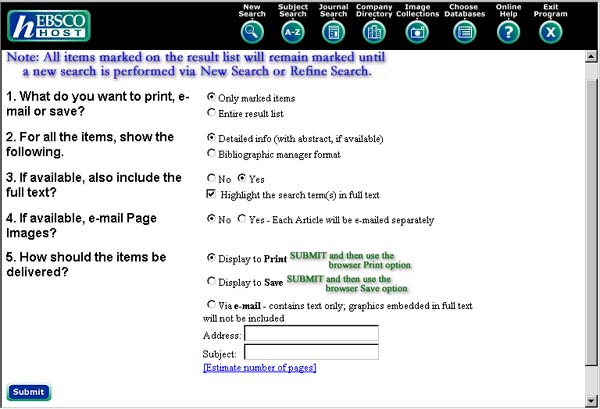
Print/e-mail/Save box. This will bring-up
Box 2.
Box 1
Box 2
EBSCO has entered default values for many selections and in
most cases they can be left as is. However, make
sure the selection in 5 is what you want.
Selecting via e-mail can save you money. Your Storm
Card permits you to make prints of 250 pages . Most students
never exceed this number. However, once you start paying
additional sums of money for printing you will be charged $.08
per page. In this case it may be cheaper to print using your
home printer.
Another advantage of e-mail is that it gives you an
electronic copy of your documents. It may be easier to cut and
past selections into your paper than to type them. (Remember to
include the correct citations whether you type or past selections
from any source into your papers.)
When the selectons are as you want them click on the Submit button at the lower left. NOTE. If you have marked documents the "Marked Records" button will appear and will be checked. If you did not check any documents the "Marked Records" button will NOT appear.
Click here or use your back button to
return to the previous screen.
Use the back button at the top of the screen to return
to the page you wish.
This page is maintained by
P. Charles Livermore
Reference Librarian, St. John's University, New York.
8000 Utopia Parkway
Jamaica, NY 11439
718 990 5330
It was last updated on July 9, 2001.
Suggestions and corrections are welcome and
should be sent to him.